The grid system formed the foundation of the placement mechanics. Players can adjust grid sizes for both small and large-scale builds, with objects snapping precisely to grid lines rather than cell centres for improved accuracy. Progression is built into the grid itself: much of the space is locked at the start, requiring players to unlock additional areas as they expand their park. This prevents overwhelming the player early on while encouraging steady growth.
Unity
This project was primarily made in Unity.
-
Multi-Layer Building
To increase creative possibilities, a multi-layer grid system was implemented. Players can build on different vertical levels, from ground-level tracks to elevated structures. Floors load and unload dynamically, showing only the active layer to reduce clutter and improve performance. While players cannot freely set floor heights, developers can tweak the pre-set distances and number of levels for balance. This design opens up complex, three-dimensional track building and park layouts.
-
Track Placement and Connectivity
Tracks can be freely placed in the world, starting from any orientation. Regular track pieces, however, must snap onto existing pieces, ensuring closed circuits and maintaining valid paths for AI-controlled racers. A connection node system prevents invalid overlaps by checking whether nodes are already in use, guaranteeing seamless and functional tracks. This approach allows creative freedom while enforcing rules that keep tracks playable.
-
Object Placement and Validation
Beyond tracks, all buildable items snap neatly to the grid for consistency and clean layouts. Players can rotate objects within the grid to customise their designs. Validators were added to prevent floating or overlapping objects, preserving polish and avoiding visual glitches.
-
Saving and Loading Systems
Using a method of saving metadata to a json file, the system supports saving every detail of the player’s park, including track positions, orientations, and structures. This ensures long-term progression, allowing players to experiment with multiple plots without losing work. The system compressed all important factors of the park into minimal metadata, upon loading a park the loading system would reconstruct the whole park from this metadata. Each park had its own json file which made the system very modular.
-
Design Influences and Research
The team researched existing track-building systems to refine their design. Neo Sprint (Atari) was considered too restrictive due to its top-down view and limited space, while TrackMania (Ubisoft) was seen as overly complex and racing-focused. Planet Coaster 2 (Frontier) offered the closest inspiration, but the aim was to create a more intuitive and accessible system suited to a tycoon-style game. The final design balanced accessibility with creative freedom, setting it apart from existing titles.
-
Planned Unit Variety
The original design aimed for four distinct unit types (Gunner, Shield-Bearer, Swordsman, and Healer), each reacting differently in battle. While only the Gunner was implemented, the modular AI structure means the framework is ready to expand with new unit classes in future versions.
-
Custom Edge Avoidance Mechanic
An early problem was that agents ignored the boundaries of the map and wandered out of the area. Standard wall avoidance behaviours failed to work correctly, so I developed a custom “edge avoidance” mechanic. This checked the plane’s bounds and applied steering forces when agents approached the edges, successfully keeping them inside the play area.
-
Combat Scenarios with Emergent Outcomes
Although only one unit type (the Gunner) was completed, the system still produced varied and unpredictable battles. Each encounter played out differently depending on health levels, distance to enemies, and steering responses. This emergent gameplay demonstrated the adaptability of the combined behaviour tree and steering system.
-
Steering Behaviours for Realistic Movement
Movement was handled through steering behaviours, enabling agents to wander, pursue targets, and avoid obstacles in a natural way. These behaviours were attached and detached as needed by the behaviour tree, making motion more fluid and responsive compared to rigid pathfinding systems like A*.
-
Behaviour Trees for Decision Making
To control agent decisions, I implemented behaviour trees instead of simpler finite state machines or overly complex neural networks. Behaviour trees allowed me to build modular and reusable logic, such as choosing when to attack, retreat, or wander. Their hierarchical design made the AI adaptable while leaving room for future expansion with new unit types.
-
Debugging Steering and Behaviour Conflicts
At first, agents would freeze because the wander node repeatedly removed and reattached behaviours, cancelling out movement. Careful debugging revealed the issue, and by restructuring how behaviours were applied, I ensured agents could combine multiple steering forces smoothly without stalling.
-
Enemy AI State Machine
Enemies were designed with multiple behaviours: patrolling when unaware, chasing when the player was visible, attacking when in range, and checking their surroundings if the player was lost. These state changes were handled through Unity’s NavMesh system and custom C# scripting, forming the foundation of the game’s stealth mechanics.
-
AI Detection and Player Search
To make the AI more dynamic, I implemented a “last known position” mechanic. When enemies lost sight of the player, they would move to the last location, rotate 360 degrees, and only return to patrol if the player was not found. Early versions had issues with spinning too fast, which I solved by adding a rotation speed multiplier.
-
Enemy Communication System
Enemies could alert each other when spotting the player. Initially I attempted a constant update check across all enemies, but this was inefficient. I replaced it with Unity’s physics overlap sphere, which collected all nearby AI within a radius and called their listening function, making enemy collaboration smooth and efficient.
-
Player Combat and Stealth Mechanics
The player could engage enemies directly or attack from behind for double damage, encouraging stealthy play. This combined with enemy patrols and communication created a layered challenge where players had to balance speed with strategy.
-
Persistent High Scores Across Scenes
The game included a timer for players to complete the level as quickly as possible. To carry times across scenes and display best scores on the main menu, I implemented a singleton object that preserved variables between scene loads.
-
Unity Version Control for Cross-Device Development
During development I had to switch between PC and laptop, which created issues transferring files. Using Unity’s version control system solved this, allowing me to reliably sync project changes and avoid data loss.
-
Planetary Simulation & Camera System
The simulation features nine planets and their moons orbiting around a scalable sun. To make the system explorable, I implemented two camera perspectives: a static overhead view and a first-person camera that can be controlled with WASD input. The first-person camera made use of Euler angles and custom vectors from my maths library to handle rotation and movement. A switching system allowed the player to move seamlessly between the two perspectives, making it easier to observe the orbits both as a whole and from within the system itself.
-
Programming & Maths Implementation
The project required a custom maths library, which I built to include vectors, 4×4 matrices, trigonometry functions, and quaternions. I created a generalised transform function that could apply scale, rotation, and translation to objects in a single step, which became essential for calculating planetary orbits. Each planet used the same script, made editable in the Unity inspector through the use of [System.Serializable], which allowed me to efficiently customise parameters for each body. Planets orbited the sun using quaternions and modified vector rotation formulas taken from lecture material, while moons reused the same system with added retrograde functionality and bug fixes. Together, these elements formed a modular and reusable framework for the entire simulation.
-
Scale & Customisation Options
A significant issue in creating the simulation was how to represent scale accurately while keeping the system observable. Real-world distances made the planets far too small and spread apart to be useful for demonstration. To address this, I created a toggle system that allowed switching between a to-scale model and a non-scaled, customisable version. I also included a slider to control the speed of the simulation, achieved by multiplying a global time variable across the system. Every planet and moon was linked to a central controller object, which handled orbit calculations and transforms, ensuring the entire simulation could be adjusted efficiently from a single script.
-
Challenges & Problem Solving
One of the largest challenges in the project was resolving scaling issues. My first attempt was to multiply real-world values down, but this caused planets to either disappear or remain unreasonably far apart. The final solution was to include a toggle between scale and non-scale models, combined with manually editable values for planet sizes when not to scale. Another issue arose when calculating planetary distances: by basing positions on object centres, planets overlapped. This was corrected by accounting for radii in the distance calculations. I also considered implementing a line-trace system for planet selection but was unable to do so within the timeframe given for this project.
-
Procedural Generation System
The dungeon generates rooms, corridors, floors, and then populates them with collectibles (coins, keys, doors) and enemies. Rooms are positioned randomly within bounds, with collision checks to prevent overlaps. Corridors connect room centres horizontally or vertically, maintaining uniform width. Keys always generate in the last room, while the player spawns in the first. Each playthrough produces a different layout, ensuring replayability.
-
Coding Practices & Design Patterns
I adopted industry-standard programming practices, including:
- Singleton pattern for managing shared data across scenes.
- Lists for storing rooms, corridors, and objects to allow batch operations.
- Modular functions for expandability and maintainability.
- Proper naming conventions, comments, and version control.
These practices made the code reusable and expandable, setting up a strong foundation for future projects.
-
Gameplay Loop & Shop System
The gameplay loop challenges the player to collect coins, find a key, and unlock the door to progress. Each new level increases dungeon difficulty. Coins can be spent in a shop to buy power-ups, introducing progression and strategy. A singleton tracks coins, shop items, and variables across scenes, ensuring consistency.
-
Challenges & Solutions
Corridor Generation: Initially corridors failed to connect rooms due to incorrect centre calculations and list-clearing errors. Debugging fixed the issue by recalculating room centres and resetting lists for each iteration.
Tilemap Wall Gaps: Corners sometimes misaligned when rooms and corridors overlapped, leaving gaps. This remained partially unsolved but identified as an area for future improvement.
Version Control Issues: Unity’s version control failed to transfer scenes correctly between devices. The solution was to wipe and re-create the repository.
-
Destroy Tool
The first feature that I added was the destroy tool, this is used to remove unwanted structures as well as give the player a partial refund for the structure that they destroyed. This involved adding script that would allow the player to use the tool, a script that made the amount of resources that were refunded be shown on screen, and script for actually destroying the structure when the player interacted with it in the correct way.
-
Random Resource Spawning
I also moved onto a more complicated task of making the trees and rocks spawn in random shapes (or clumps) on the map. Much like they would in real life, like a forest of trees for example. My initial attempts at making this script caused the trees and rocks to always spawn in 5 by 5 squares, which was not the desired result. After some trial and error I managed to make the trees and rocks spawn in random shapes, and make these random shapes appear on the map at random locations.
-
Bug Testing
The end of the project was more bug testing and play testing, in order to make sure the game was in a good place to submit. As requested by a producer, I made a list of bugs and brought them up in a group meeting. Many of these bugs were then worked on as a team during the meeting, allowing us to efficiently bring the game to a good end point.
-
Movement
When I started this project I learnt how to move objects in Unity. As this was my first time doing a task like this, I did not program it from scratch, instead I found 2 lines of code that rotated an object on stack overflow. However, I had to adjust these lines of code as they did not rotate the object in the correct way. As a result, I was able to successfully create the code that was used in the final game:

-
Art
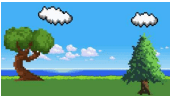
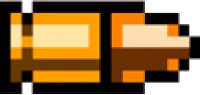
The art style for the game was created using a number of pixel art assets located on the internet that were all free to use and uncopyrighted. These images were then slightly edited in photoshop, to make them fit the task. Backgrounds were removed from the bullets and the scene for the game created by using many different images. Below is the completed scene along with the gun and bullet assets.